Mission Project
Project Name: Robot Arm Control System
Libraries used for this Mission
Here are the libraries needed for our Mission
For GUI and robot camera display we will import:
OpenCV library for camera input and display streams.
IPython.display for jupyter environment camera/ GUI output.
ipywidgets for creating widgets in GUI output.
event_name custom library for setting current action within GUI.
import cv2 as cv
from IPython.display import display
import ipywidgets as widgets
from event_name import EventName
For robot arm movement controls we will import:
Arm_Lib library for the robot arm movement functions.
mission_lib custom library for the robot arm movement controls.
from mission_lib import Movement
import Arm_Lib
For Music controls we will import:
pygame library for the sound drives it provides.
from pygame import mixer
mission_lib custom Library
mission_lib.py

The
mission_lib.pyallows for functions that would control the robot arm movements. The python file itself contains Movement class with 3 initial variablesArm: for storing the Arm_Device object (User Input when initializing the Movement object )
first_angle: for storing angle information for the first servo (default value: 90)
third_angle: for storing angle information for the third servo (default value: 45)
pincher_angle: for storing angle information for the pincher (sixth) servo (default value: 90)
class Movement:
    """
    Functions for robot arm movements

    :Arm: Robot Arm object
    :first_angle: Angle for first servo
    :third_angle: Angle for third servo
    :time: The time length for the movement
    """

    def __init__(self, Arm):
        self.Arm = Arm
        self.first_angle = 90
        self.third_angle = 45
        self.pincher_angle = 90
There are total of 4 main functions for up, down, left, right movement and 2 minor functions for moving the pincher. All the functions recieve time parameter from the user. This defined how fast a movement is to be finished. On our main notebook, we pre-define 3 different time variables to be put into the functions.
Main function (Up, Down movements):
The functions responsible for up and down movements are (
move_up(self, time),move_down(self, time)). These functions set 2nd and third servos in a fixed position and moves the 3 servo to a fixed angle everytime the function is called. I the angle of the third servo exceeds the given amount, the update will stop.Example:
def move_up(self, time):
    """
    Move the Robot Arm Up. If the limit is reached, stop the update.

    :param time: Movement time for the Robot Arm
    :type: int

    """

    self.Arm.Arm_serial_servo_write(2, 90, time)
    self.Arm.Arm_serial_servo_write(4, 45, time)
    if self.third_angle >= 90: # Stop the update if the angle exceeds 90
        self.Arm.Arm_serial_servo_write(3, self.third_angle, time)
    else:
        self.third_angle += 15 # Update the 3rd servo
        self.Arm.Arm_serial_servo_write(3, self.third_angle, time)
Main function (Left, Right movements):
Unlike the Up and Down movement functions, the Left and Right movement function only updates the 1st servo which is responsible for turning the robot arm. Similar to Up and Down movement functions, the update will stop once the angle reaches or exceeds the specified amount.
Example:
def move_left(self, time):
    """
    Turn the Robot Arm to the left. If the limit is reached, stop the update.

    :param time: Movement time for the Robot Arm
    :type: int

    """

    if self.first_angle >= 150:
        self.first_angle = 180
        self.Arm.Arm_serial_servo_write(1, self.first_angle, time)
    else:
        self.first_angle += 30
        self.Arm.Arm_serial_servo_write(1, self.first_angle, time)
Minor function (Pinchers)
The pinching and releasing functions activate the 6th servo which controls the pincher with specified amount.
Pincher (Pinch):
def move_pincher(self, time):
    """
    Pinch the pincher, If the limit is reached, stop the update.

    :param time: Movement time for the Robot Arm
    :type: int

    """
    if self.pincher_angle >= 165:
        self.pincher_angle = 165
        self.Arm.Arm_serial_servo_write(6, self.pincher_angle, time)
    else:
        self.pincher_angle += 5
        self.Arm.Arm_serial_servo_write(6, self.pincher_angle, time)
Pincher (Release):
def release_pincher(self, time):
    """
    Pinch the pincher

    :param time: Movement time for the Robot Arm
    :type: int

    """
    self.pincher_angle = 90
    self.Arm.Arm_serial_servo_write(6, self.pincher_angle, time)
event_name custom Library
event_name.py
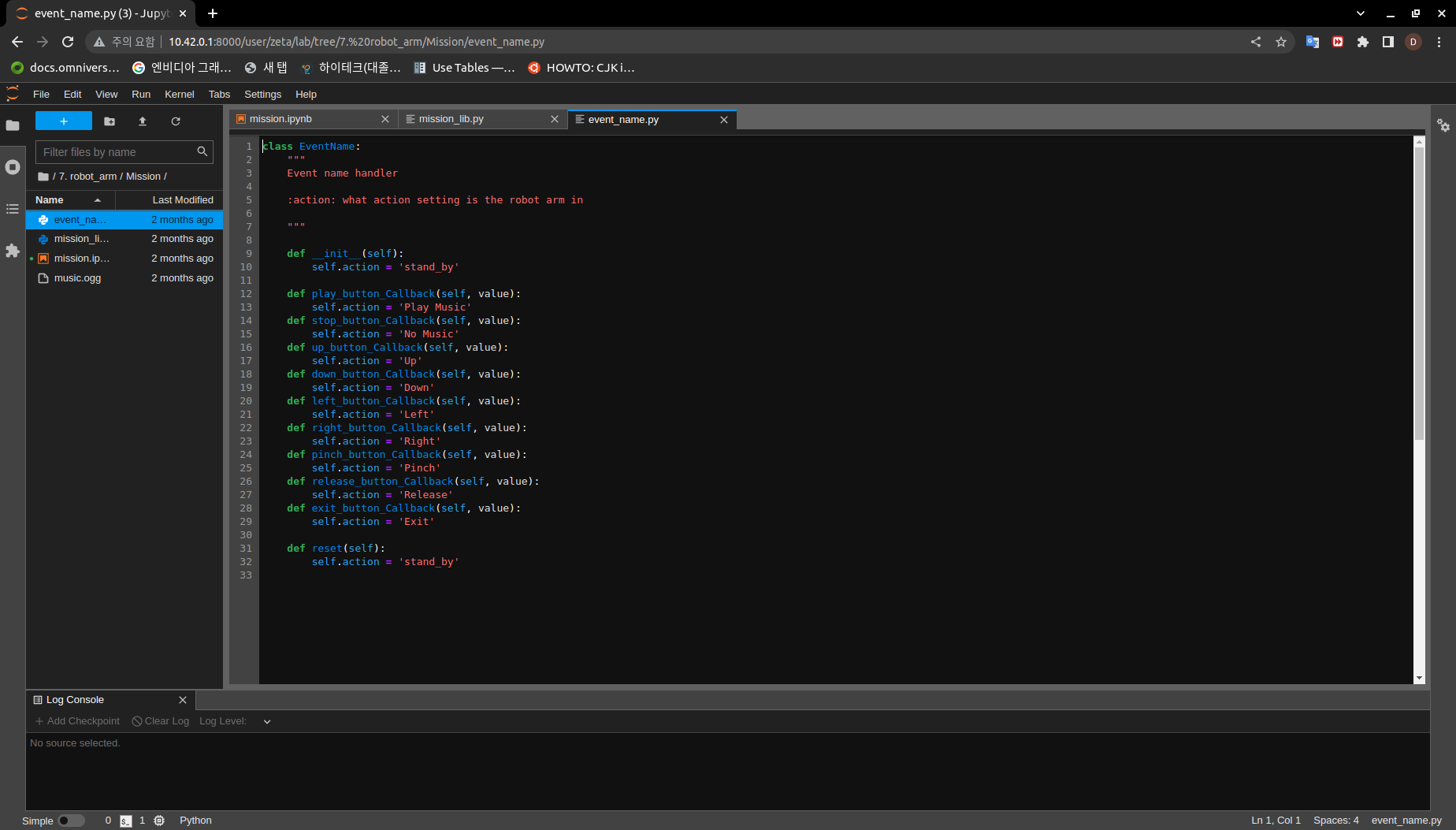
This python library is responsbile for creating an action instance and providing settler funtions.
class EventName:
    """
    Event name handler

    :action: what action setting is the robot arm in

    """

    def __init__(self):
        self.action = 'stand_by'

    def play_button_Callback(self, value):
        self.action = 'Play Music'
    def stop_button_Callback(self, value):
        self.action = 'No Music'
    def up_button_Callback(self, value):
        self.action = 'Up'
    def down_button_Callback(self, value):
        self.action = 'Down'
    def left_button_Callback(self, value):
        self.action = 'Left'
    def right_button_Callback(self, value):
        self.action = 'Right'
    def pinch_button_Callback(self, value):
        self.action = 'Pinch'
    def release_button_Callback(self, value):
        self.action = 'Release'
    def exit_button_Callback(self, value):
        self.action = 'Exit'

    def reset(self):
        self.action = 'stand_by'
Lets Start the Mission!!!
Open the mission folder and open the mission.ipynb file.
mission.ipynb
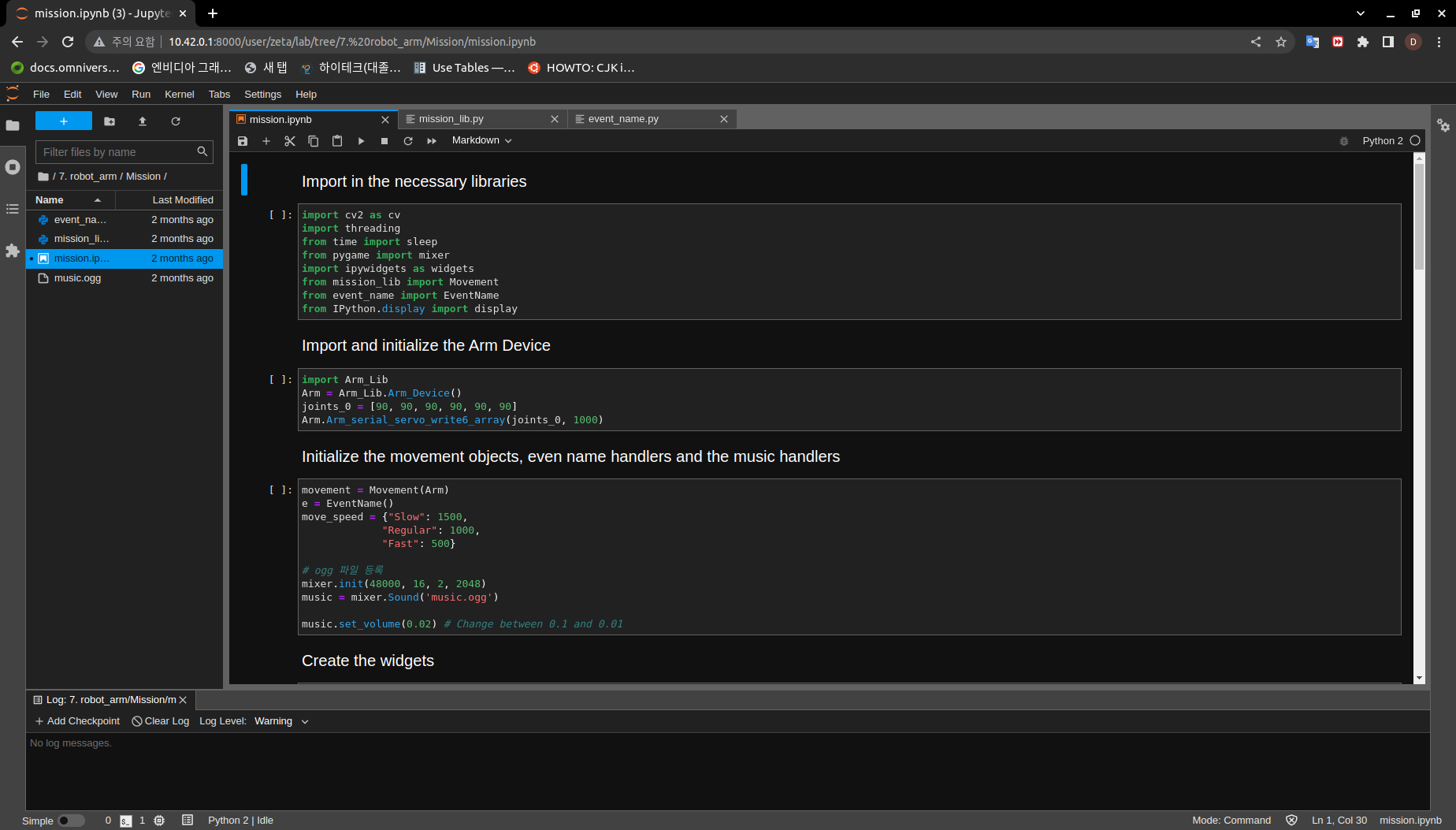
First, import in the necessary libraries
import cv2 as cv
import threading
from time import sleep
from pygame import mixer
import ipywidgets as widgets
from mission_lib import Movement
from event_name import EventName
from IPython.display import display
Import and initialize the Arm Device
import Arm_Lib
Arm = Arm_Lib.Arm_Device()
joints_0 = [90, 90, 90, 90, 90, 90]
Arm.Arm_serial_servo_write6_array(joints_0, 1000)
Initialize the Movement and Event name objects. When initializing Movement object, provide the Arm object as the parameter.
movement = Movement(Arm)
e = EventName()
Initialize the different speeds of the robot arm, and music object.
move_speed = {"Slow": 1500,
            "Regular": 1000,
            "Fast": 500}

# ogg 파일 등록
mixer.init(48000, 16, 2, 2048)
music = mixer.Sound('music.ogg')

music.set_volume(0.02) # Change between 0.1 and 0.01
Create the GUI widgets:
button_layout = widgets.Layout(width='200px', height='60px', align_self='center')
short_layout = widgets.Layout(width='200px', height='75px', align_self='center')

output = widgets.Output()

choose_movement = widgets.ToggleButtons(options=['Slow', 'Regular', 'Fast'], button_style='success',
                                        tooltips=['Description of slow', 'Description of regular', 'Description of fast'])

# Movement Widgets
pinch_button = widgets.Button(description='Pinch', button_style='success', layout=button_layout)

release_button = widgets.Button(description='Release', button_style='primary', layout=button_layout)

up_button = widgets.Button(description='Up', button_style='primary', layout=short_layout)

down_button = widgets.Button(description='Down', button_style='primary', layout=short_layout)

left_button = widgets.Button(description='Left', button_style='primary', layout=short_layout)

right_button = widgets.Button(description='Right', button_style='primary', layout=short_layout)

# Sound Widget

play_button = widgets.Button(description='Play Sound', button_style='success', layout=button_layout)

stop_button = widgets.Button(description='Stop Sound', button_style='success', layout=button_layout)

# Exit Widget
exit_button = widgets.Button(description='Exit', button_style='danger', layout=button_layout)

imgbox = widgets.Image(format='jpg', height=480, width=640, layout=widgets.Layout(align_self='auto'))

img_box = widgets.VBox([imgbox, choose_movement], layout=widgets.Layout(align_self='auto'))

Slider_box = widgets.VBox([pinch_button, release_button, play_button,stop_button, exit_button],
                        layout=widgets.Layout(align_self='auto'))
Move_box = widgets.VBox([up_button, down_button, left_button, right_button],
                        layout=widgets.Layout(align_self='auto'))

controls_box = widgets.HBox([img_box, Move_box, Slider_box], layout=widgets.Layout(align_self='auto'))
# ['auto', 'flex-start', 'flex-end', 'center', 'baseline', 'stretch', 'inherit', 'initial', 'unset']
Create the event handlers for the widgets. We connect these handlers with our event name, so that when the user presses the buttons, the names of the action changes.
play_button.on_click(e.play_button_Callback)
stop_button.on_click(e.stop_button_Callback)
pinch_button.on_click(e.pinch_button_Callback)
release_button.on_click(e.release_button_Callback)
up_button.on_click(e.up_button_Callback)
down_button.on_click(e.down_button_Callback)
left_button.on_click(e.left_button_Callback)
right_button.on_click(e.right_button_Callback)
exit_button.on_click(e.exit_button_Callback)
Create the camera function, and open the camera of our robot arm.
def camera():

    # Open camera
    capture = cv.VideoCapture(1)
To process the incoming frames from the capture variable, create a loop that will run as long as camera feed is open.
# Be executed in loop when the camera is opened normally
while capture.isOpened():
Within the loop grab the camera frame and resize it to (640, 480) using the cv.resize function. With the help of if function, listen to the action variable, and assign an appropriate function when the action variable is changed.
_, img = capture.read()

img = cv.resize(img, (640, 480))

if e.action == 'Up':
    movement.move_up(move_speed[choose_movement.value])
    e.reset()
if e.action == 'Down':
    movement.move_down(move_speed[choose_movement.value])
    e.reset()
if e.action == 'Left':
    movement.move_left(move_speed[choose_movement.value])
    e.reset()
if e.action == 'Right':
    movement.move_right(move_speed[choose_movement.value])
    e.reset()
if e.action == 'Pinch':
    movement.move_pincher(move_speed[choose_movement.value])
    e.reset()
if e.action == 'Release':
    movement.release_pincher(move_speed[choose_movement.value])
    e.reset()
if e.action == 'Play Music':
    music.play()
    e.reset()
if e.action == 'No Music':
    music.stop()
if e.action == 'Exit':
    cv.destroyAllWindows()
    capture.release()
    break
imgbox.value = cv.imencode('.jpg', img)[1].tobytes()
sleep(0.25)
Execute the camera() function. Since we are working with multiple different variables and functions, wrap the process within a threat.
display(controls_box,output)
threading.Thread(target=camera, ).start()
Be sure to delete the robot arm after exiting the GUI.
Pick up an object and place it somewhere else!
Now that we have built our program, using the GUI control and grab an object and place it somewhere else.

(IMPORTANT)
- The preset angles of the arm might not be fit for the environment you are in. Go to the mission_lib.py to change the angles or add more servo motor updates.
- It is highly recommended that you change and experiment around the mission_lib.py file and see how the movement of the arm is set up.