NVIDIA TAO Toolkit
refer to this link for notion version: https://speckled-crime-3ee.notion.site/NVIDIA-TAO-Toolkit-5305189cc3e342f38d4dc579e469a840
The NVIDIA TAO Toolkit simplification tool that allows for usage of NVIDIA pre-trained models or user defined ONNX to be retrained with custom data (transfer learning) to create Computer Vision (CV) or/ and Conversational AI (Conv AI) Models. With minimal training, TAO toolkit allows you to: (https://docs.nvidia.com/tao/tao-toolkit/text/overview.html)
Add additional classes to an existing pre-trained model
Re-train a model to adapt to different use cases.
Reduce overall size of CV models with pruning methods.
=========Direct Quote from NVIDIA toolkit manual=========
Fine-tune models for CV use cases such as object detection, image classification, segmentation, and key-point estimation using NVIDIA pre-trained CV models.
Fine-tune models for Conversational AI use cases such as automatic speech recognition (ASR) or natural language processing (NLP) using NVIDIA pre-trained conversational AI models.
NVIDIA TAO Toolkit allows for 3 types of models to be trained.
General purpose model architecture
NVIDIA optimized pre-trained models for (CV and Conv AI)
User Defined ONNX model
General Purpose Model Architecture
The general purpose model architecture allows for pre-trained weights with user specified backbone (feature extraction) models to be trained with specific custom data. This method allows for far faster model training as it does not involve randomized weight initialization, but trained weights, which can be used as the starting point for the models.
Key words:
backbone: models to be used as the feature extractor within model architecture (term defined in terms of CV)
model architecture: model architecture refers to architectures such as Detectnet_v2 which has been trained using Open image dataset.
Available model architectures in relation to the available backbones:
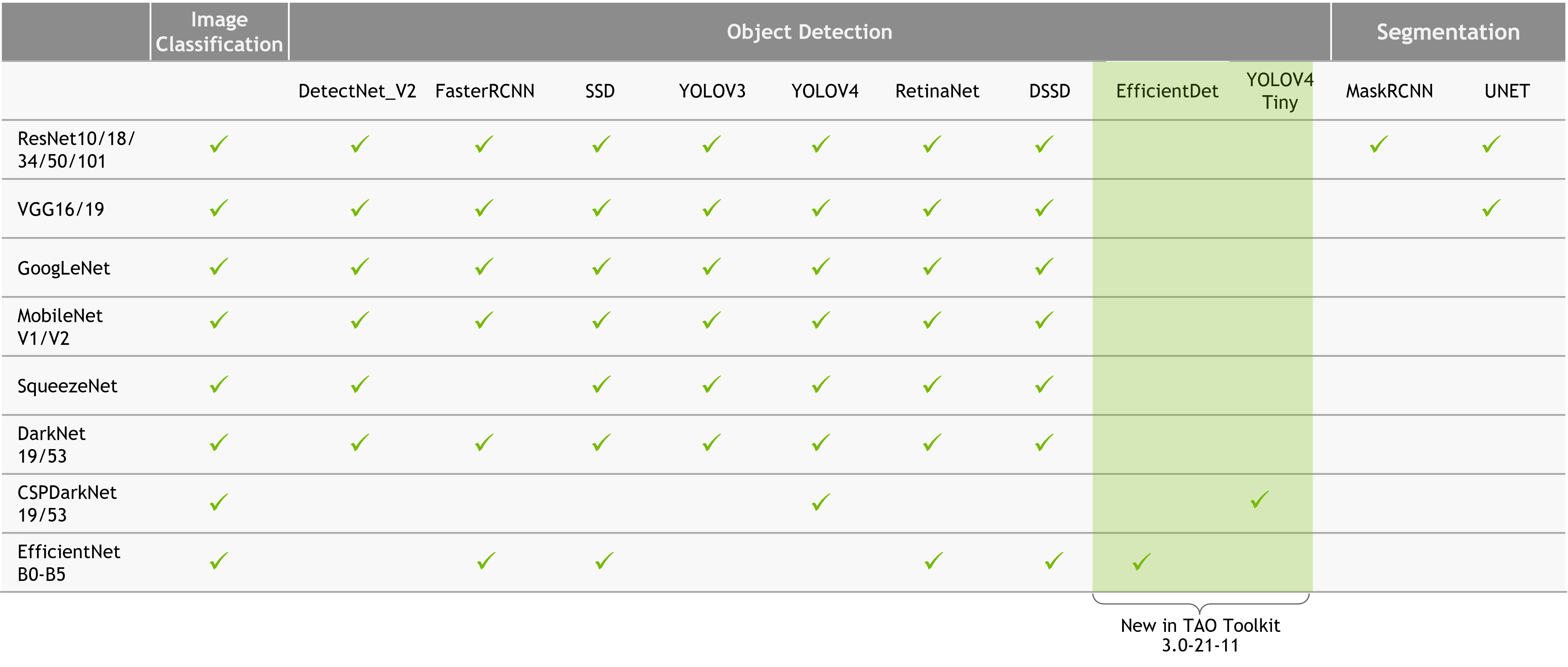
NVIDIA Optimized Pre-trained models
The NVIDIA Optimized Pre-trained models are trained models that can be deployed from the box, or retrained with transfer learning for specific custom dataset. More information on: https://docs.nvidia.com/tao/tao-toolkit/index.html
These models are not are general and can be task specific, but since they are optimized both in terms of hyper-parameters and model efficiency, it is used a lot in custom tasks.
User Defined ONNX model
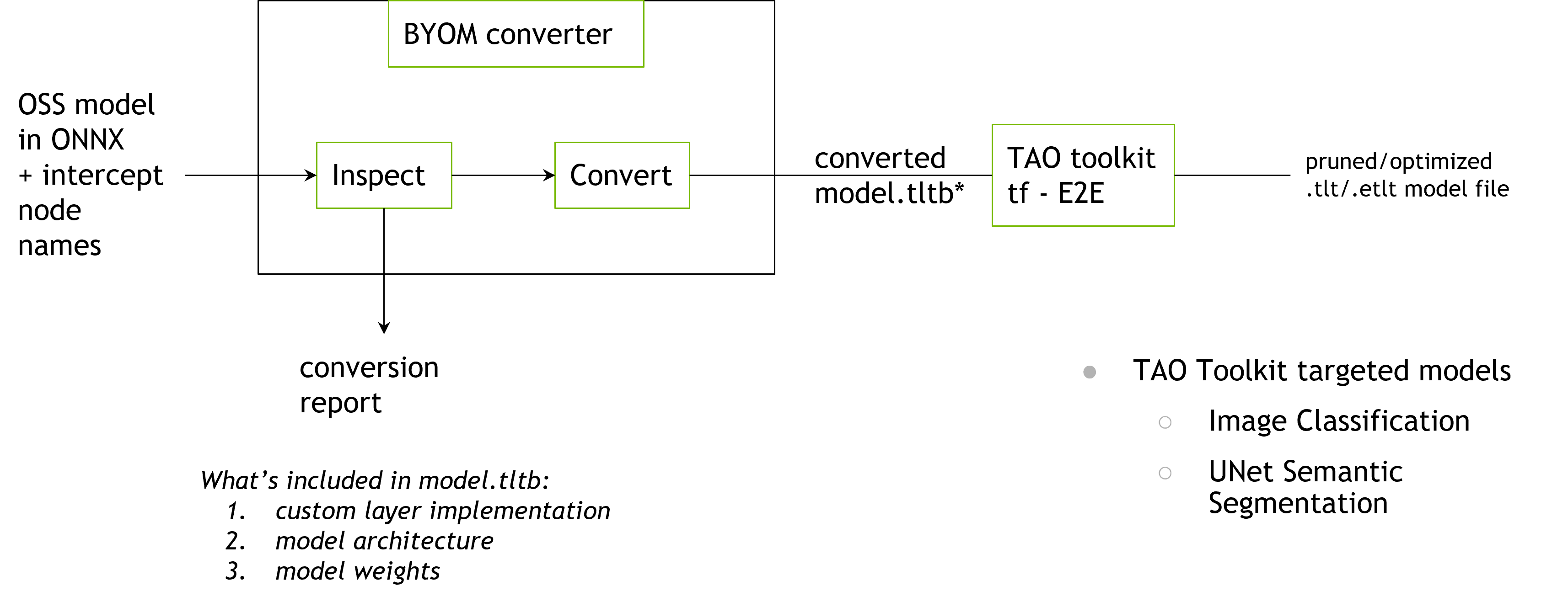
Term Explanation
ONNX
ONNX stands for ⇒ Open Neural Network ExchangeIt is an open format for trained Machine Learning (ML) Models that allows the model to be used in various ML frameworks and tools.
- Most models created in frameworks such as Pytorch, (Chainer, Caffee2) allows for the model to be saved in specific version of ONNX format.
The ONNX tool allows for models to be converted to ONNX format.
ONNX Model Zoo is a container for several ONNX pre-trained models (Computer Vision, NLP, and other).
Transfer Learning
Transfer learning is a machine learning method where a model developed for a task is reused as the starting point for a model on a second task. (..*is exploited to improve generalization in another setting)*
Most commonly used as the starting point for computer vision or natural language processing tasks as they require mass amounts of data and preparation for model creation.
- Two approaches for transfer learn
Develop Model Approach
Pre-Trained Model Approach
Develop Model Approach
Select Source Task
Develop Source Model
Reuse Model
For using the model as the staring point for a model on the second task, this process may involve using all or parts of the model, depending on the modelling technique used.
Tune Model
Optionally, the model may need to be adapted or refined on the input output pair data available for the task of interest
Pre-trained Model Approach
Select Source Model
Pre-trained models from many research institutions such as NVIDIA
Reuse Model.
Tune Model
When to use Transfer Learning
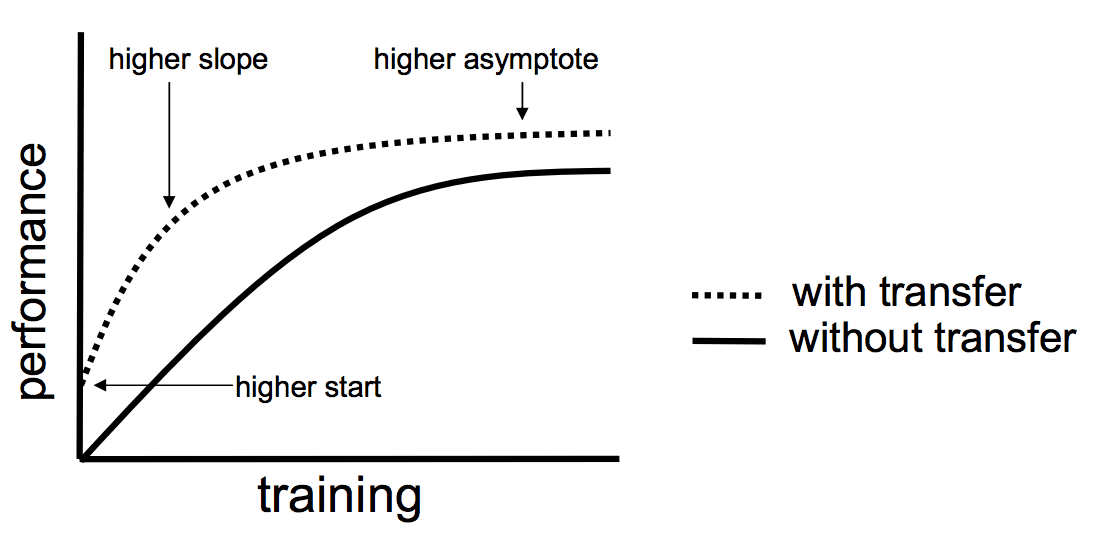
The transfer learning provides 3 possible benefits
Higher Start
Higher Slope
Higher Asymptote
TAO Toolkit Pre-Requisite Installation Guide
(Note!!!) The Installation method mentioned below will be on Ubuntu 20.04 system
TAO Launcher Methods
(Note!!!) There are 2 Methods to get TAO running on a system (CLI launch and Container launch). This guide only covers the CLI Launch Methods.
TAO Run Example (Detectnet_v2)
TAO Run Example (YOLO_4_Tiny)
TAO Run Example (Tensor Visualization)
There are ways to connect the live logs of the model training with third party API’s. But if one wishes to visualize the progression of the model on the host computer, use TensorBoard visualization method.